
Create tailored PDFs from STEP
Personalise PDFs for each customer, market, and use case with Mirrix PDF-on-Demand
- Unlock new product communication use cases
- Put tailored PDF creation in the hands of the business
- Add the details that make each PDF fit the customer and situation
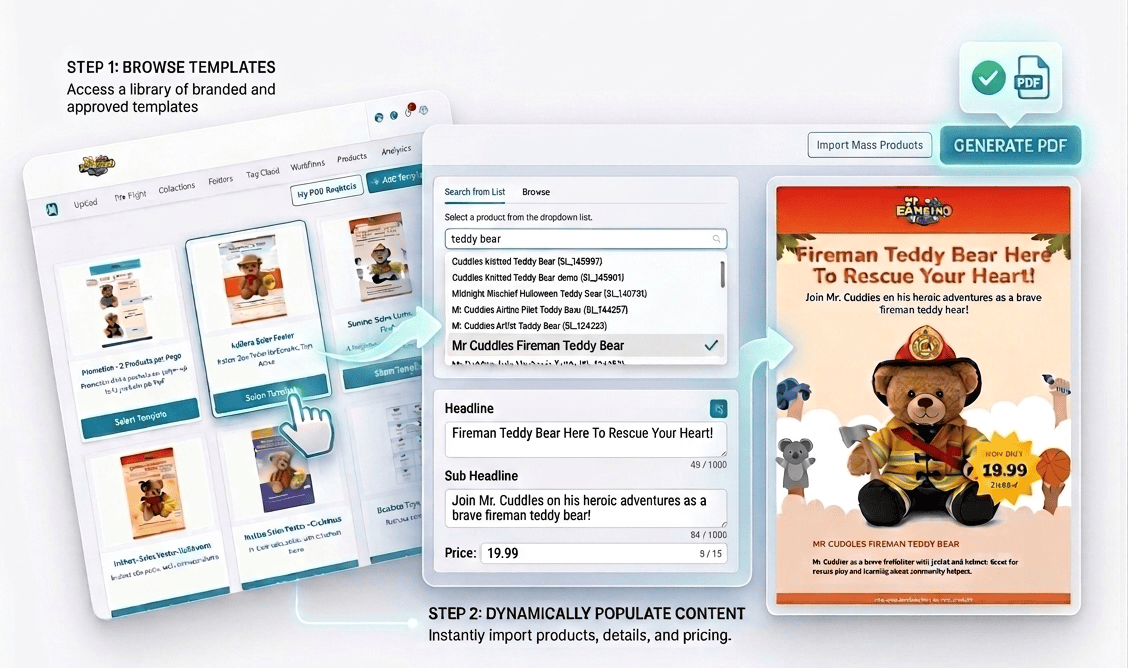
Everything needed to turn STEP into a tailored PDF engine
PDF-on-Demand makes it possible to move beyond static product documents. Start from trusted STEP content, then tailor each PDF to the customer, market, campaign, or situation it is meant for.
-
Tailored content inputs
Add custom text and other context-specific details at the moment the PDF is created, so each document fits its intended purpose.
-
Dynamic product selection
Select the relevant products directly from STEP and generate PDFs from the latest available product content.
-
Document-level personalisation
Insert details that apply to the whole document, such as campaign messaging, recipient context, market information, or commercial notes.
-
Product-level personalisation
Create price lists with custom prices per product or other product specific details.
-
Custom logos and images
Include customer logos, partner branding, or other supporting visuals to make each PDF more specific to the audience and context.
-
AI-generated text assistance
Use AI prompts defined by administrators to help generate selected parts of the document content.
-
Bulk PDF generation
Upload Excel input and generate large volumes of tailored PDFs in one process.
-
DocuSign integration
Move generated PDFs directly into signature workflows when the document needs to be approved, signed, or completed.
-
Store back into STEP
Keep generated PDFs governed, traceable, and available inside the same ecosystem as the source content.
Made for teams that need product communication to move faster
PDF-on-Demand is not just for a central publishing team. It is built for the people across the business who need customer-ready product documents without waiting for manual document production every time.
-
Sales teams
Create tailored product packs for specific meetings, prospects, or follow-ups using live STEP content and the context of the opportunity.
-
Marketing teams
Produce campaign-ready PDFs for different markets, audiences, and initiatives without rebuilding the document from scratch.
-
Channel and partner teams
Generate partner-ready product communication with the right branding, product selection, and commercial context.
-
Local market and field teams
Adapt PDFs to local needs, regional messaging, or market-specific requirements while staying within a governed setup.
-
Compliance and regulatory teams
Generate market-specific documents from trusted content and reduce the risk of disconnected, manually maintained PDFs.
-
Service and support teams
Create manuals, parts lists, and support documents that reflect the specific products, variants, or situations involved.
-
STEP and product content teams
Extend the value of trusted product data into customer-facing communication without adding disconnected document processes.
-
In-store teams
Create localised price signs, shelf-edge labels and in-store promotions based on branded templates and up-to-date product data.
Turn one source of truth into many tailored document outputs
Once PDF creation becomes fast, tailored, and easy to govern, a much wider range of use cases becomes practical.
Sales packs for customer meetings
Generate curated product documents tailored to a customer, opportunity, or industry conversation.
Partner and distributor PDFs
Create ready-to-share documents with selected products, partner-relevant details, and branded elements.
Market-specific product communication
Tailor documents for local markets, regional messaging, or country-specific product communication needs.
Local campaign and store material
Enable teams closer to the market to produce the PDFs they need for promotions, launches, or local activity.
Compliance and documentation packs
Generate controlled PDF outputs for regulated or documentation-heavy use cases where consistency matters.
Service manuals and support documents
Create PDFs that reflect the actual products, variants, or service situations involved.
Printable comparisons and shortlists
Support buyer conversations with tailored comparison sheets, printable selections, and decision-support material.
Documents that continue into signature workflows
Generate the document from STEP and move it directly into DocuSign when execution is part of the process.
Many companies already generate PDFs from STEP.
But in most cases, those PDFs are still too generic, too slow to adapt, or too dependent on central teams and manual effort. That limits the role PDFs can play in product communication.
When every tailored variation requires extra work, many useful use cases simply never happen. Sales settles for generic documents. Local teams wait. Marketing creates workarounds. Valuable product content stays locked in standard outputs.
Mirrix PDF-on-Demand changes that.
It makes tailored PDFs practical. Teams can start from STEP and add the final details that make the document fit the customer, the market, and the use case it is meant for.

From STEP content to tailored PDF in a few simple steps
Choose a template
Start from an approved layout designed for the kind of document you want to produce.
Select products and add context
Pick the relevant products from STEP and add the details that tailor the PDF to the situation.
Generate the PDF
The system combines trusted STEP content with the selected inputs and produces a finished document.
Use it immediately
Download the ready file or have it delivered by email.
The result is a faster path from trusted product data to customer-ready communication.
Built by STEP specialists who saw the same pattern again and again
STEP customers often have well-structured and well-governed product content. But when that content needs to become a customer-ready PDF, the process is still often too manual, too centralized, and too limited.
Because the value of product data is not only in storing and governing it. The value is also in turning it into communication that people can actually use. PDF-on-Demand was built to close that gap by making tailored PDF creation practical inside a STEP-centered way of working.
Built by a team with deep STEP experience. Designed around real enterprise product communication workflows. Created to extend the value of governed STEP content into the last mile of communication.
Schedule your demoA better alternative to generic PDFs and manual document work
| Mirrix PDF-on-Demand | Traditional approach | |
|---|---|---|
| Output | Tailored output: each PDF can reflect the customer, market, and use case it is meant for. | Generic output: standard PDFs with little room for situational tailoring. |
| Turnaround | On-demand generation: documents are produced when needed, not queued behind manual work. | Slow turnaround: new versions or one-off requests depend on manual effort. |
| Ownership | Business empowerment: more teams can create the PDFs they need within a controlled setup. | Central bottlenecks: business users rely on specialist teams to get the document they need. |
| Content flow | STEP-centered content flow: the PDF starts from the same product content foundation the business already trusts. | Disconnected inputs: extra details are often added outside the core content process. |
| Scale | Scalable personalisation: one-off, bulk, and triggered generation all become possible within the same capability. | Limited scale: tailored variations become too costly or too slow to produce. |
When the workflow does not stop at the PDF
Some PDFs are not just meant to be shared. They are meant to move forward into approval, commitment, or execution.
With DocuSign integration, generated PDFs can continue directly into a signature workflow when the process requires it.
That makes PDF-on-Demand useful not only for communication, but also for document-driven business processes where the final document needs to be completed, approved, or signed.
Generate from STEP Personalise for the situation Send for signature

FAQ
Do we need STEP Publisher to use PDF-on-Demand?
Yes. PDF-on-Demand builds on STEP and STEP Publisher as the publishing foundation.
Can users personalise the PDF before it is generated?
Yes. Users can add situation-specific inputs to tailor the final document.
What kinds of details can be customised?
The setup can support many kinds of custom inputs depending on the template and use case, including commercial, contextual, recipient-specific, and document-specific content including both custom text and custom images/graphics.
Can we generate PDFs in bulk?
Yes. PDF-on-Demand supports bulk generation through Excel-based upload.
Can PDFs be generated automatically from other systems?
Yes. PDF generation can be triggered through APIs from systems such as CRM, CPQ, eCommerce, and other platforms.
Can custom text be reviewed or validated before the PDF is finalised?
Yes. AI-assisted review can help check spelling and support brand-oriented wording rules for custom inputs.
Can the generated PDF be sent for signature?
Yes. PDFs can continue into DocuSign workflows where signing is part of the process.
Are generated PDFs stored back into STEP?
Yes. Generated documents are stored back into STEP so they remain part of the governed content environment.
Can this be used for other than sales documents?
Yes. The component is relevant across sales, marketing, channel, compliance, service, and other document-driven use cases.
What type of documents can I produce with Mirrix PDF-on-Demand?
Mirrix PDF-on-Demand can support a wide range of document types, as long as they can be defined through a STEP-driven template. That can include sales sheets, customer-specific product packs, partner and distributor PDFs, market-specific product information, promotional material, compliance documents, service manuals, parts lists, comparison sheets, printable shortlists, and other tailored product communication. In practice, the exact document types depend on the templates your organisation sets up in STEP and STEP Publisher.
Still have questions?
Please reach out to us.